The Missing Piece in PC Media Centers: Full Menu Navigation for 4K Ultra HD Blu-rays
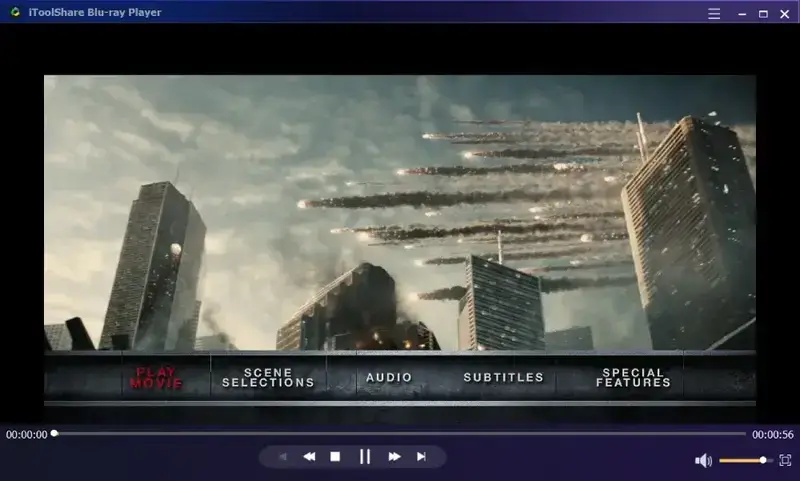
For home theater enthusiasts running desktop media setups, transitioning from hardware physical players to PC-based setups offers incredible flexibility. However, desktop cinema software has historically suffered from an irritating functional limitation: the loss of the original disc menu interface. When loading raw files or optical media, most standard open-source multimedia software bypasses the interactive shell entirely, dumping users directly into individual video streams without bonus features, audio settings, or chapter selection panels.
Restoring this authentic interactive element requires dedicated software that balances rigorous hardware rendering with complex decryption capabilities, transforming your standard monitor into an immersive cinema environment.
The Complexity of Menu Reconstruction and HDR
Recreating interactive Blu-ray menus on a computer platform is a demanding technical hurdle. The interactive navigation interfaces utilize specific graphics layers that rely heavily on GPU hardware acceleration. When a player fails to synchronize these sub-picture rendering paths properly, users often experience system instability or missing text interfaces. Furthermore, maintaining accurate High Dynamic Range (HDR) grading behind these overlaid graphical user interfaces requires dynamic tone-mapping, preventing text overlays from washing out bright video backdrops.
How to Establish a Flawless 4K Connection on Desktop
Configuring a personal computer to read high-bitrate Ultra HD assets involves specific system configurations. Hardware requirements, such as ensuring correct firmware updates for your optical drive and deploying steady key registries to handle advanced protections like AACS, are fundamental. If you are struggling with setting up your desktop rig, consulting a comprehensive tutorial on how to play 4k uhd blu ray on pc will clarify essential system properties and settings to maximize stability.
Pro-Tip: To ensure optimal layout rendering, ensure that your media software has specific granular overrides for graphic processing, allowing menus to display naturally even when running inside modern ARM64 virtualization setups.
The Complete Solution: iToolShare Blu-ray Player
To eliminate these playback roadblocks, deploying a dedicated software core provides a comprehensive answer. The iToolShare Blu-ray Player stands out as an elite option, carefully engineered to focus heavily on authentic disc replication. It addresses typical media architecture challenges by offering several targeted capabilities:
- Full Interactive Menu Operation: Fully reconstructs and supports standard Blu-ray, DVD, and Ultra HD menus, restoring chapter selections, deleted scenes, and authentic setup navigation without system faults.
- Advanced Hardware Tuning: Implements specialized logic to handle hardware rendering paths smoothly, completely removing common interface visual artifacts and rendering bugs.
- Stunning HDR & 4K Fidelity: Seamlessly manages HDR color metadata, ensuring vibrant rendering on modern displays and utilizing advanced tone mapping algorithms for standard setups.
- High-Resolution Sonic Delivery: Supports direct sound bitstreaming, allowing master-grade theater tracks to pass directly to audio systems without compressed conversions.
Conclusion
Desktop theater setups should never feel like an inferior compromise compared to standalone hardware players. By selecting a dedicated system engine that brings full menu controls back to local media execution, you unlock the complete experience envisioned by the filmmakers. Combining an optimized hardware configuration with a sophisticated software core ensures smooth performance and maximum fidelity for years to come.

Comments